01
Detect
Every invoice is checked as it arrives. Anything that doesn't match, such as a rate above agreement, a quantity above the field ticket, a possible duplicate or a closed AFE, lands in one queue with the reason and the amount in question.
Kivo checks every invoice against field tickets and agreements, codes costs to the right wells, AFEs and GL accounts, and brings your team in only where judgment is needed.
The Oil & Gas AP challenge
A single service invoice can trigger a chain of operational, accounting and approval decisions.
Validate service rates, quantities and charges against field tickets, agreements and supporting evidence.
Assign expenses to the right wells, AFEs, entities and GL accounts, including split allocations.
Resolve discrepancies and coordinate reviews and approvals across AP, Operations and Accounting.
The resultManual effort, delays, financial exposure and limited visibility.
The solution
Kivo is intelligent AP automation for Oil & Gas. It combines AI document understanding, configurable business rules and workflow orchestration, moving each invoice forward and bringing people in only where judgment is needed.
Read and interpret invoice and field ticket data, from uploaded files or a designated SharePoint folder.
Check rates, quantities and charges against tickets and agreements.
Assign costs to wells, AFEs, entities and GL accounts.
Send discrepancies, reviews and approvals to the right people.
Set business rules in natural language.
Track expenses and AP performance.
Document understanding
Business controls
Human oversight
Every invoice, from intake to GL-ready coding and AFE allocation files for your ERP.
Inside Kivo
Kivo brings invoice details, supporting evidence and validation results into one workspace, so AP teams focus on the exceptions that need attention.
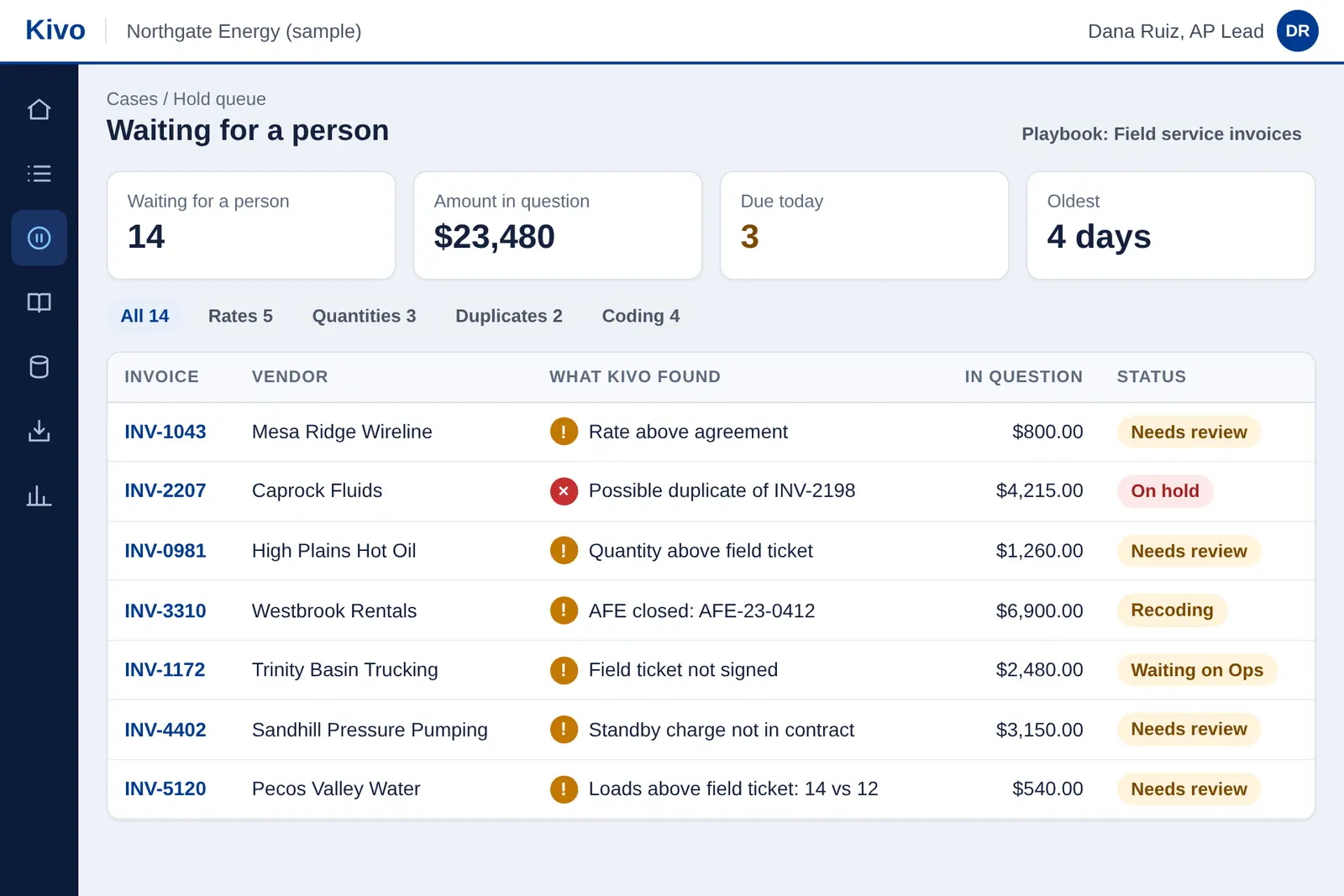
Every invoice is checked as it arrives. Anything that doesn't match, such as a rate above agreement, a quantity above the field ticket, a possible duplicate or a closed AFE, lands in one queue with the reason and the amount in question.
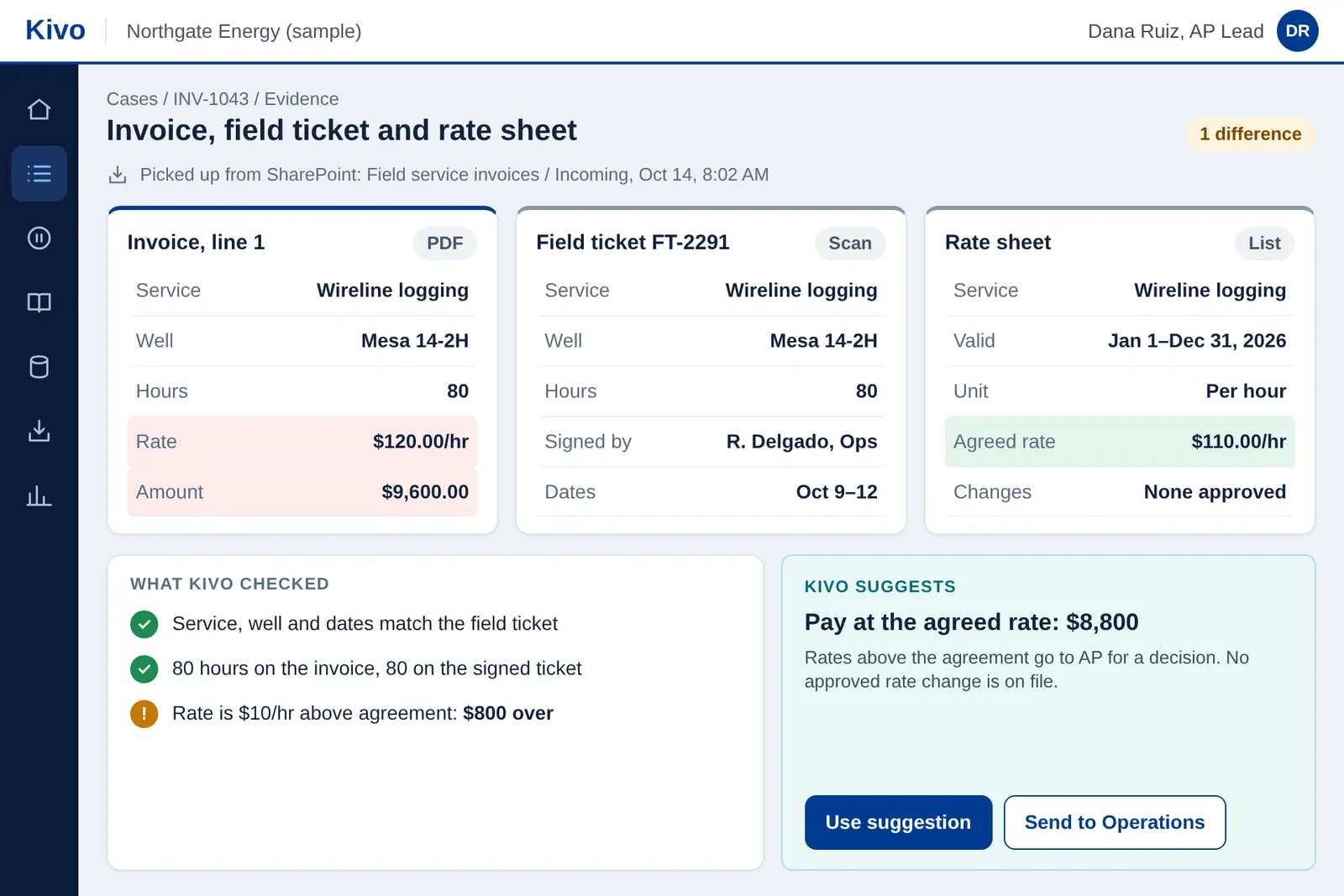
Kivo lines up the invoice, the signed field ticket and the rate sheet, and highlights exactly what differs. Reviewers see all the evidence in one place instead of hunting through email, folders and spreadsheets.
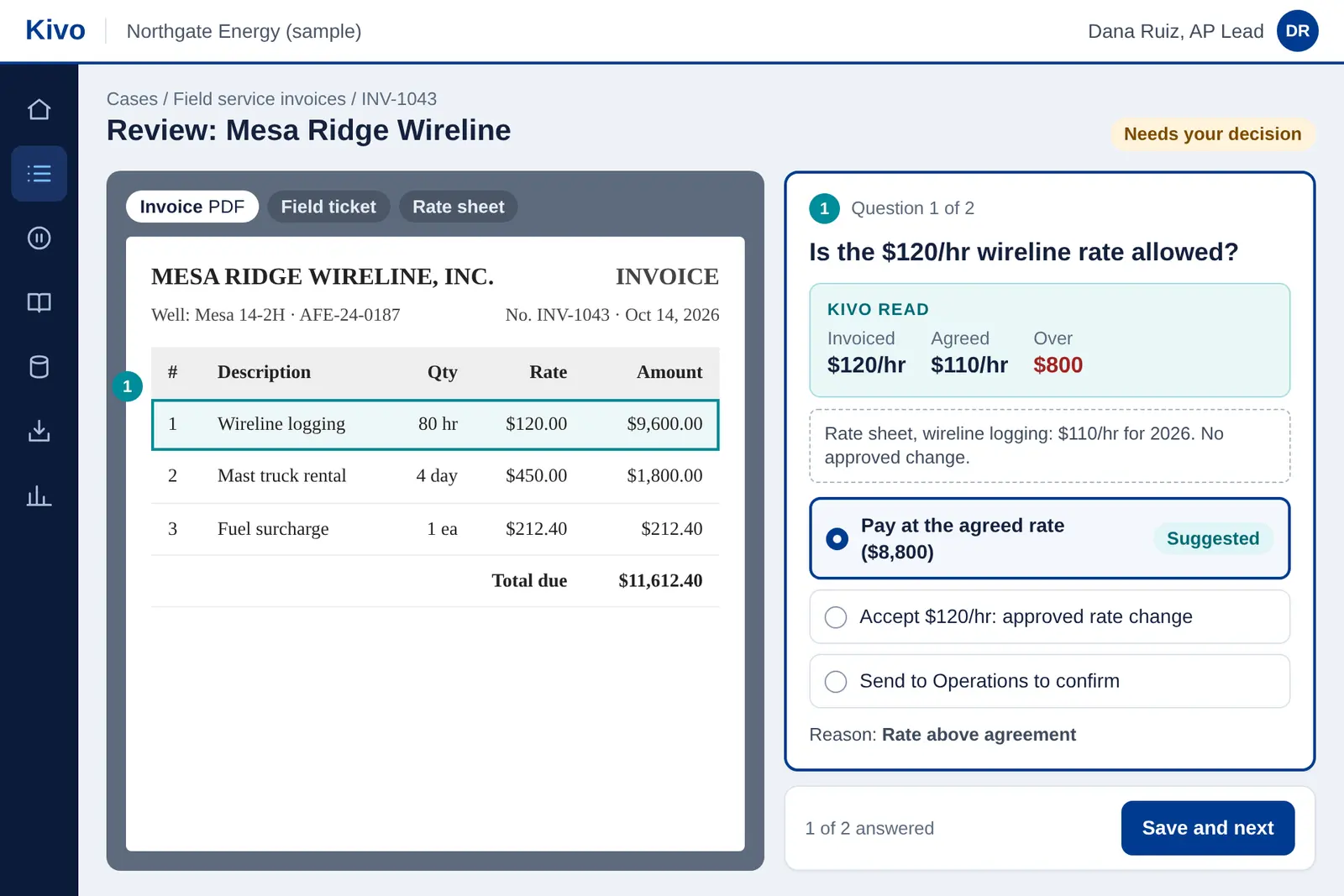
A reviewer sees one plain question, what Kivo read, the evidence behind it and a suggested answer. They choose an answer, the reason is kept with the invoice, and it moves to the next step.
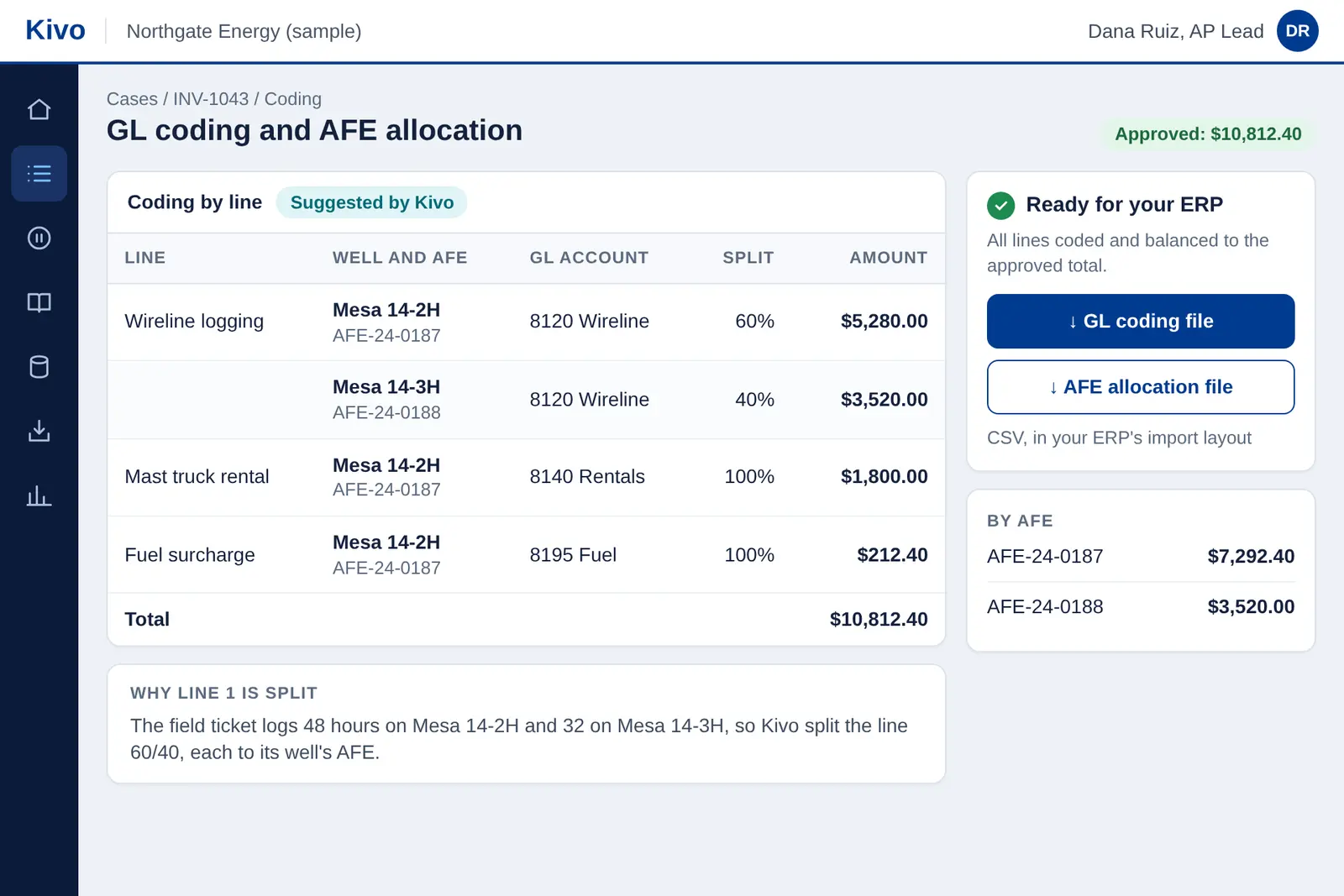
Kivo codes each line to the right well, AFE and GL account, and splits shared costs using the field ticket, such as hours by well. Review the coding, then download GL coding and AFE allocation files to load into your ERP.
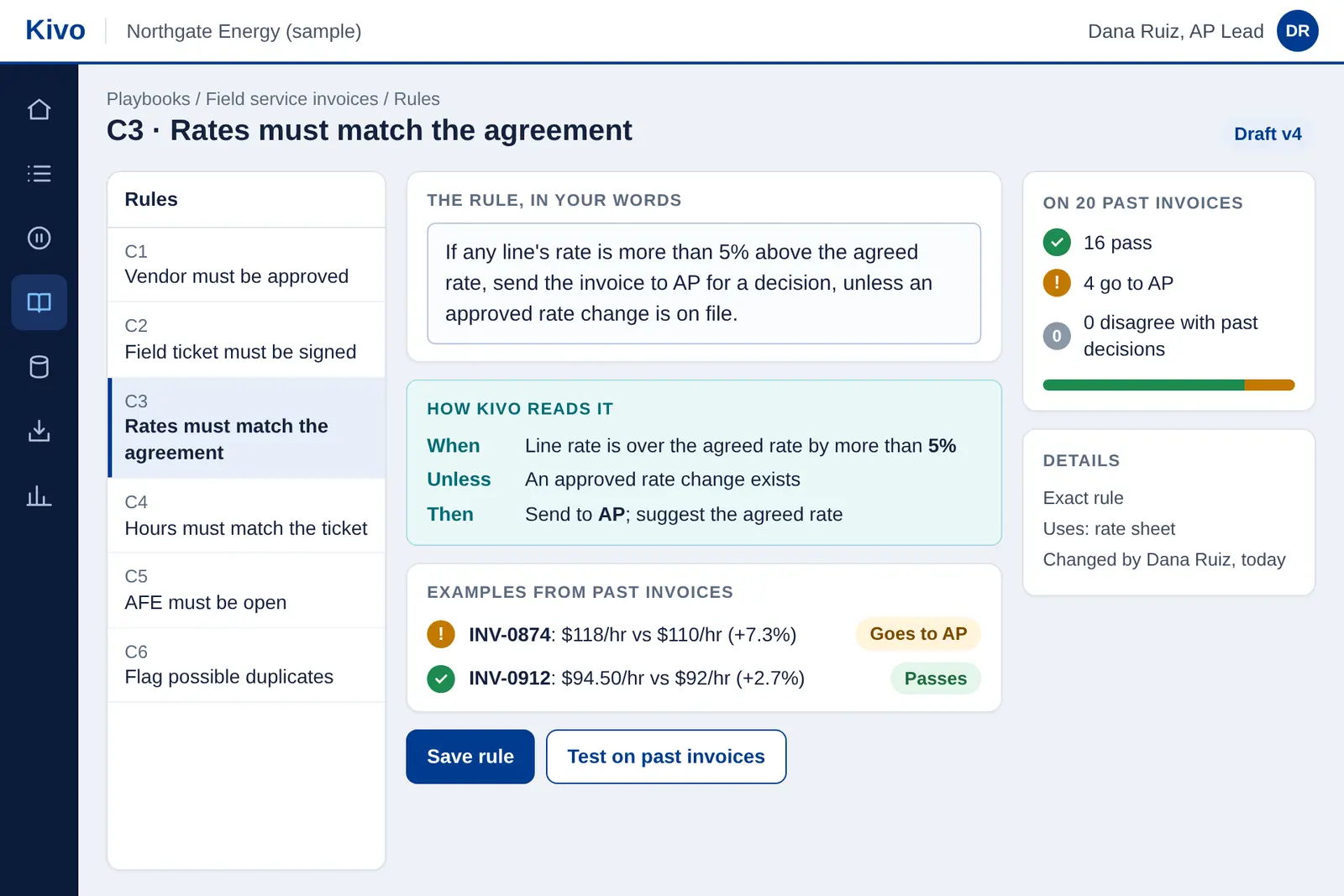
Write business rules the way you'd explain them to a colleague. Kivo shows how it reads each rule and tests it on past invoices, so you see what would pass and what would go to a person before the rule goes live.
See the workflow in action
Why Kivo
A purpose-built AP solution for Oil & Gas, developed by Xalta on the OutSystems platform. It brings together industry-specific invoice workflows, AI, configurable business rules and human oversight in one scalable application.
 Built on

Designed for Oil & Gas AP: field tickets, rate agreements, wells, AFEs and split allocations.
Runs on OutSystems Developer Cloud, a secure, scalable, enterprise-ready platform.
Domain expertise, implementation and ongoing support from the team that builds Kivo.
Xalta’s track record
Before Kivo, Xalta automated accounts payable for a deepwater operator using RPA and custom scripts.
more invoices processed, with AP workload largely unchanged
less time spent on vendor invoice coding
Results from Xalta's earlier RPA and custom-script work for one deepwater operator, before Kivo. They describe that engagement and do not predict results with Kivo.
Kivo brings that experience into one intelligent AP solution.Customer pilot program
Xalta is inviting up to three qualifying Oil & Gas operators to run Kivo on their own past invoices, at no fee.
Shared across three qualifying operators. Help shape the future of Oil & Gas AP.
Run representative AP workflows on your own invoices.
Accuracy, processing effort and exception handling.
Influence future Kivo capabilities.
Complete the pilot registration form.
Talk to us: a short call to check fit.
Sign a no-fee pilot agreement and an NDA.
Share past invoices and supporting documents. No connection to your live systems needed.
Get your results: a pilot report and a read-out with your team.
Limited program for up to three qualifying operators, subject to selection, eligibility and a signed pilot agreement. The $100,000 is the maximum aggregate estimated value of Xalta services across all three participants, not cash or a guaranteed allocation. Timelines are targets. No commitment to implement, to achieve any result or to purchase.
More detail
Explore how Kivo works and what to expect from the customer pilot.
Kivo reads the invoice and its supporting documents, such as field tickets and rate agreements. It checks rates, quantities and charges against them and against your rules, then proposes GL coding and AFE allocations. Invoices that pass go forward; anything that doesn't is routed to the right person with the evidence attached.
No. Kivo works alongside the tools you already use. It handles the checking, coding and routing between receiving an invoice and recording it in your ERP.
Kivo produces GL-ready coding and AFE allocation files that you load into your ERP, so it works with the ERP you have today. Posting directly to ERPs is on our product roadmap.
You can upload files, or give each playbook (Kivo's steps and rules for one kind of invoice) a designated SharePoint folder. Kivo picks up new documents from that folder, and the playbook's reference data, such as rate cards and AFE lists, from a similar folder. Connections to other systems are on our product roadmap.
You describe business rules in plain language, such as rate tolerances, approval limits or coding by vendor and service. Kivo applies them to every invoice. Only users you authorize can change them.
Kivo reads, checks, codes and routes. Your team sets the rules, reviews exceptions and approves. Kivo doesn't approve payments or post entries on its own.
It flags the item, explains why, and sends it to the right reviewer with the evidence side by side. The reviewer decides, and the invoice moves on.
Kivo runs on OutSystems Developer Cloud, so application data is held in OutSystems' cloud. Files and reference data you share with us are stored securely by Xalta. To read documents, Kivo uses the language model you choose (Claude, ChatGPT, Gemini, Mistral or Qwen models) with your own keys, so your agreement with that provider governs how it handles your data. Access is limited to your authorized users and Xalta's delivery team, under confidentiality terms. We're happy to walk your IT and security team through the details.
It depends on your invoice volumes, rules and systems. After a pilot we can scope a rollout with you and give an estimate. Any rollout is a separate agreement.
Kivo is an intelligent AP solution. Oil & Gas AP is its first solution. Ask us about other finance and operations processes you'd like to automate.
Oil & Gas operators in the United States with their own accounts payable team. Service companies and non-operators are welcome to book a demo.
Xalta selects participants based on fit: invoice volume, the use case, data availability and team availability. Registering doesn't guarantee a place.
It's the combined estimated value of the services Xalta provides across all three pilots, not per company. It isn't cash, credit or a discount, and it can't be applied to a later purchase.
There's no fee for Xalta's services. Each side covers its own costs, such as staff time and travel, and you pay the usage costs of your own language model account.
Up to 100 past invoices with their supporting documents, the reference data and rules for the use case, and a process owner for about 2–4 hours a week. Your IT team provides API keys for the language model you choose and handles access and approvals on your side.
We plan for 6–8 weeks once the pilot agreement is signed. That's a target, and timing depends on how quickly documents and feedback come through.
No. The pilot creates no obligation to buy anything, and any later engagement would be a separate agreement.
No. The pilot is an evaluation. We measure results together on your sample invoices and share them in a report, but we don't promise any particular outcome.
We delete your files and data within 90 business days after the pilot ends, and confirm it in writing if you ask. Your originals stay with you.
No. You share past invoices as files. If you prefer, Kivo can pick them up from a designated SharePoint folder.
Get started
Book a live demo or register for the customer pilot. We'll reply within one business day.